Cross-Platform Promotions: How to Find Game Deals on Every Device
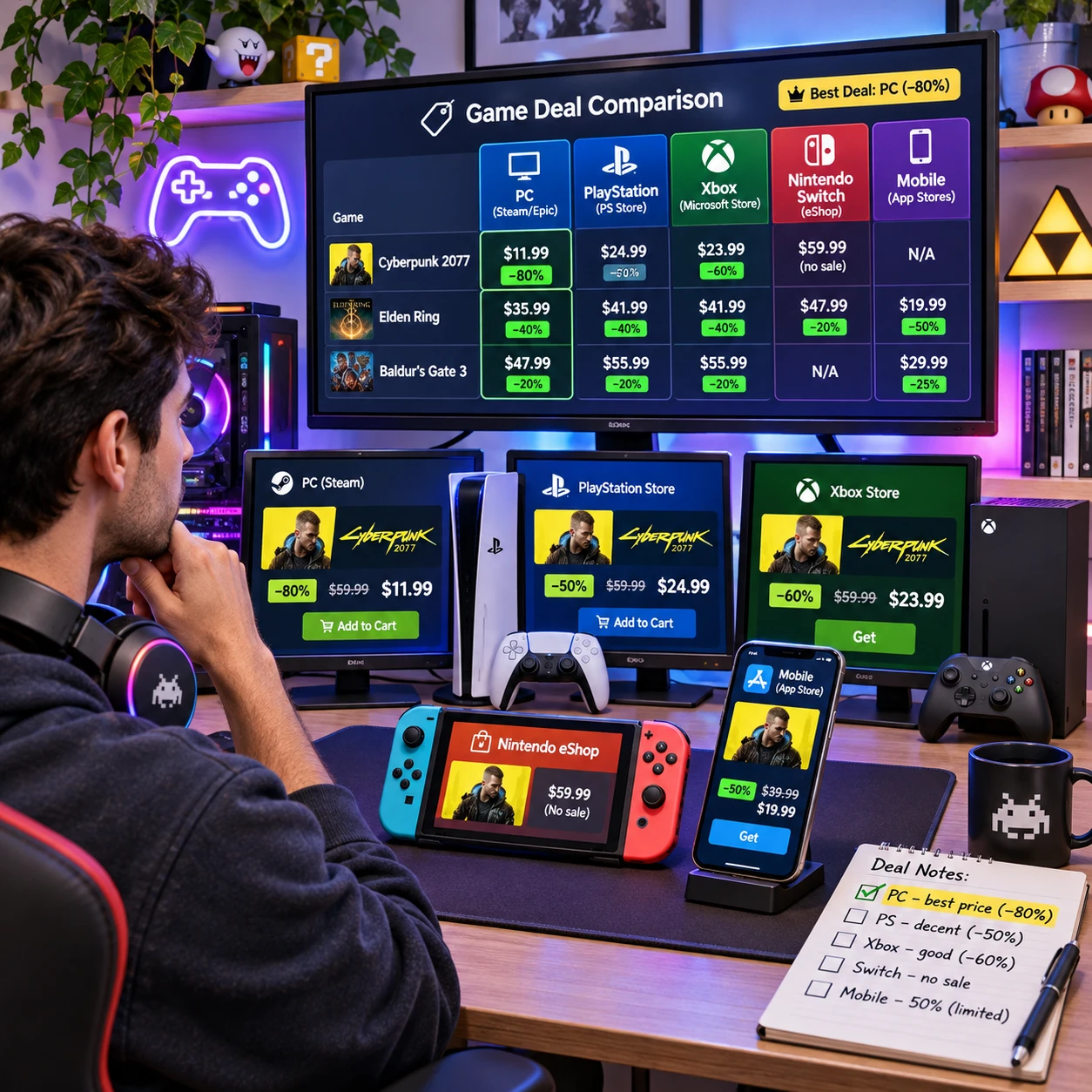
A game deal can appear on a PC storefront, a console marketplace, or a mobile app, and the offer may look different on each. Cross-platform promotions help gamers discover these opportunities across devices, but they do not guarantee the same price, game version, or availability everywhere.
Knowing how to compare the details is the difference between a genuine bargain and a discounted game you cannot play on your preferred setup. Here’s what these promotions mean, where to find them, and what to verify before buying.
What cross-platform promotions mean for gamers
Cross-platform promotions are deals or promotional announcements that reach players across more than one gaming device or platform. They can highlight discounts, game bundles, free-to-play offers, or seasonal sales, while the actual offer may still be limited to a particular store or device.
The term describes how a promotion is presented or discovered. It does not describe a game’s multiplayer or save features. A publisher might promote a title on social media, its website, and several storefronts at once, but sell it at different prices on PC, PlayStation, Xbox, and Nintendo Switch.
- Cross-platform promotion: An offer is advertised to players across multiple platforms or channels.
- Cross-play: Players on supported platforms can play together online.
- Cross-progression: Game progress or account data carries between supported platforms, subject to the game’s rules.
These features can overlap, but one does not imply another. A discount advertised to PC and console players does not mean the game supports cross-play, and buying it on two devices may not share progress. Check the game’s feature list separately from the promotion.
Where promotions appear across PC, console, and mobile
Promotions appear in digital game stores, publisher announcements, and deal listings for PC gaming, consoles, and mobile gaming. Each channel has its own catalog and terms, so a deal spotted on one device may not be available on another.
On PC, players commonly check digital game stores such as Steam, the Epic Games Store, GOG, and publisher launchers. Sales may include individual games, complete editions, game bundles, or limited-time free claims. Confirm which store supplies the game and whether it requires an additional launcher or account.
Console players can browse the PlayStation Store, Xbox Store, and Nintendo eShop. Sales may vary by region and console generation. Subscription services can also offer access to games, but access through a subscription is different from owning a discounted copy; availability can change under the service’s terms.
Mobile promotions appear in the Apple App Store and Google Play. These may involve free downloads, in-app purchases, temporary price cuts, or special content. A free-to-play offer usually means the base game costs nothing to download; optional purchases may still affect the experience.
Deal pages and publisher newsletters can help you spot sales across these storefronts. Treat them as discovery tools, then verify the price and conditions on the platform’s official store before purchasing. Store listings are the final check for current availability.
How to compare deals between platforms
To compare game deals between platforms, check the exact edition, total price, included content, and compatibility before deciding. A lower sticker price can be worse value if it excludes a major expansion or applies to a device you do not own.
Use this quick comparison before you buy:
- Match the edition: Compare standard, deluxe, and complete editions like for like. Check whether a bundle includes expansions, bonus items, or only the base game.
- Calculate the real cost: Note the final price, currency, tax where shown, and any required subscription or add-on. A free-to-play game may still offer optional purchases.
- Verify the platform: Confirm the listing is for your PC operating system, PlayStation model, Xbox console, Nintendo Switch, or mobile device. Similar product names can refer to different versions.
- Read the offer terms: Look for sale end dates, regional restrictions, redemption requirements, and whether the deal is a purchase, a free claim, or subscription access.
- Check account and save details: If you plan to switch devices, confirm whether cross-progression is supported and whether it requires linking accounts.
For example, a complete-edition PC bundle may appear cheaper than a console standard edition during a sale. That is not a fair comparison until you account for the different content. Similarly, a game bought on one console platform usually should not be assumed to transfer to another; check the publisher’s policy before paying twice.
A simple rule helps: compare the version you will actually play, not just the percentage off. A large discount on an incompatible or incomplete edition is still the wrong deal.
Why the same game may have different offers on each device
The same game can have different offers on PC, PlayStation, Xbox, Nintendo Switch, and mobile because each storefront manages its own pricing, catalog, and sale schedule. Platform eligibility, region, and promotion terms also affect what a player sees.
Publishers may coordinate a broad sale while setting different discounts or dates for each store. A PC version might enter a bundle while a console edition receives a temporary price cut later. Mobile editions can differ further, especially when they use free-to-play pricing or in-app purchases rather than a one-time purchase.
Other common reasons for variation include:
- Storefront rules: Each digital store has its own listing, pricing, and promotion process.
- Technical differences: A version may not exist for every device, or it may have different features and content.
- Regional availability: Prices, release dates, and eligibility can vary by country or account region.
- Promotion conditions: A deal may be limited to new subscribers, a specific edition, or a defined purchase window.
That variation is normal, but it makes screenshots and old deal posts unreliable. Check the live product page for your region and device. If an offer depends on a subscription, confirm whether it grants permanent ownership or access only while the subscription remains active.
Tips for finding promotions that fit your setup
To find promotions that fit your setup, start with the devices and stores you actually use, then verify every deal on its official product page. This keeps your search focused and reduces the chance of buying the wrong version.
- Make a short wishlist. Track the games you want and the platforms you own. Add the edition or expansion you’re looking for, not just the title.
- Follow reliable deal sources. Subscribe to storefront wishlists, publisher newsletters, or reputable game-deal listings. Use alerts to notice price drops, but confirm the offer directly with the store.
- Compare across devices deliberately. If you own more than one platform, check each store rather than assuming a promotion is shared. Compare final price and included content.
- Read the fine print before checkout. Check region, sale expiry, subscription requirements, account linking, and device compatibility.
- Pause on urgency claims. A countdown or steep discount can push a rushed purchase. If the game is not on your wishlist, take a moment to check reviews and playtime expectations.
It can also help to separate ownership from access. A discounted purchase may remain in your library under the store’s terms, while a subscription catalog title can leave the service. The subscription route may be good value if you plan to play several included games soon; a purchase may suit you better if you want long-term access through that storefront.
How game reviews can help you decide
Game reviews help you judge whether a promotion is worth buying by putting the discount in context. They can reveal how a game plays, how well it runs on a specific device, and whether its content matches your expectations.
For cross-platform shopping, look for reviews of the version you intend to buy. A PC review may not describe performance on Nintendo Switch or mobile, and a console edition may have different controls, visuals, or update timing. Player feedback can add useful detail, but weigh recent comments carefully because patches may change performance after launch.
Before purchasing, check for information that matters to your setup:
- Performance and stability on your target device
- Whether the game is single-player, online-only, or requires extra services
- How much content comes with the edition on sale
- Whether players report technical problems or missing features on that platform
A low price does not make a game a good fit if it runs poorly on your device or relies on features you do not want. Pair the offer details with platform-specific reviews, then decide whether the game suits your tastes and how you play.
Frequently asked questions
These answers clarify what cross-platform promotions mean and what to check before buying a game deal.
What does cross-platform promotion mean in gaming?
It means a promotion is marketed or made discoverable across multiple gaming platforms or channels. The actual discount may still apply to only one storefront, region, or device.
Does a cross-platform promotion mean a game supports cross-play?
No. Cross-platform promotion concerns how players find an offer. Cross-play is a game feature that lets supported players on different platforms play together.
Can the same game deal be available on every device?
Sometimes, but there is no guarantee. Price, edition, timing, and availability can differ between PC, PlayStation, Xbox, Nintendo Switch, and mobile stores.
What should I check before buying a discounted game?
Confirm the platform and region, edition and included content, final price, offer expiry, and any subscription or account requirements. If you expect to move between devices, check cross-progression separately.